
왜 Loki가 필요할까?
- 팀원 모두 k8s 서비스에서 수집하는 로그를 보고자하는 니즈가 있었고
- kubectl log <pod이름> 그만 치고 싶었다.
사실 로그 수집하는 솔루션은 굳이 Loki가 아니여도 된다. 데이터독 같이 우수한 솔루션을 붙여도 된다.
하지만 나는 돈이 부족했기 때문에 오픈소스 Loki를 사용하게되었다.
Loki야 해-줘
글에 오류가 있을 수 있습니다. 오류는 댓글에 남겨주시면 정말정말 감사하겠습니다.
소중한 시간 내어 봐주셔서 감사합니다:)
Helm 설치 (이미 설치 되어있다면 패스)
다양한 애플리케이션을 k8s에 쉽게 배포할 수 있게 도와준다.
Node.js의 npm, Python의 pip같은 개념이다.
k8s가 자체 제공하는 API가 아닌 타 라이브러리의 의존성이 추가되기 때문에 Helm을 설치하여 관리
Helm 설치
Helm chart란?
Chart는 Helm의 리소스 패키지이다.
K8S 클러스터에서 애플리케이션이 기동되기 위한 필요한 리소스들이 포함되어 있다.
Helm은 하나의 배포 프로젝트를 chart단위로 관리한다.
Helm chart관련 공식문서
Charts
Explains the chart format, and provides basic guidance for building charts with Helm.
helm.sh
Loki 알아보기
K8s에서 Helm을 통해 Loki를 설치할 수 있는 방법은 Loki-Stack과 Loki-Distributed이다.
Loki Stack
- Loki를 단일 노드로 구성하여 배포한다.
- 로그 수집, 저장 및 검색을 단일 노드에서 처리한다.
Loki Distributed
- Loki를 분산환경에서 배포하기 위해 설계되었다.
- Loki 구성 요소들을 다수의 노드를 분산키기고, 대량의 로그를 처리하는데 적합하다.
간단한 fastAPi app이기 때문에 Loki-stack을 사용했다.
Loki stack 설치하기
helm repo add grafana <https://grafana.github.io/helm-charts>
helm repo update
values.yaml 수정하기 (가장 중요!)
1️⃣ values.yaml 찾아보기
우선 기본으로 내장된 values.yaml을 찾아야 한다.
~# helm show values grafana/loki-stack
위의 명령어를 치면 아래와 같은 yaml 파일이 나온다.
test_pod:
  enabled: true
  image: bats/bats:1.8.2
  pullPolicy: IfNotPresent

loki:
  enabled: true
  isDefault: true
  url: http://{{(include "loki.serviceName" .)}}:{{ .Values.loki.service.port }}
  readinessProbe:
    httpGet:
      path: /ready
      port: http-metrics
    initialDelaySeconds: 45
  livenessProbe:
    httpGet:
 /* 너무 길어서 생략*/
2️⃣ Loki와 Promtail에 적절한 리소스 산정하기
리소스 타입
CPU와 메모리는 각각 리소스타입이다. CPU는 컴퓨팅 처리를 나타내며 쿠버네티스 CPU 단위로 지정된다. 메모리는 바이트 단위로 지정된다.
리눅스 워크로드에 대해서는 huge, page로 리소스를 지정할 수 있는데 Huge Page는 노드 커널이 기본 페이지 크기보다 훨씬 더 큰 메모리 블록을 할당하는 리눅스 관련 기능이다.
CPU 리소스는 항상 리소스의 절대량을 표현하며 500m cpu는 거의 같은 야의 컴퓨팅 파워를 가리킨다.
memory 에 대한 제한 및 요청은 바이트 단위로 측정된다. E, P, T, G, M, k 와 같은 수량 접미사 중 하나를 사용하여 메모리를 일반 정수 또는 고정 소수점 숫자로 표현할 수 있다.
k8s 클러스터 기준으로 리소스를 산정해보기
실제 사용할 수 있는 자원의 양을 파악하려면
kubectl describe nodes
위와 같은 명령어를 이용하면 된다.
백엔드 노드
  Resource           Requests    Limits
  --------           --------    ------
  cpu                710m (4%)   1 (6%)
  memory             670Mi (2%)  1990Mi (7%)
  ephemeral-storage  0 (0%)      0 (0%)
  hugepages-1Gi      0 (0%)      0 (0%)
  hugepages-2Mi      0 (0%)      0 (0%)
현재 요청된 CPU는 약 710m 이고 limit로 1G(?) 정도를 확보하고 있다.
메모리는 670Mi를 요청했고 limit로 1990Mi가 확보되어있다.
타 리소스들이 어떻게 할당되어있는지 확인해보자.
kube-system alb-ingress-controller-867d44557-v5gkc 100m (0%) 100m (0%) 90Mi (0%) 180Mi (0%) 37d
- alb ingress controller의 경우 cpu req도 100m, cpu limit도 100m이다. memory req는 90Mi, Memory limit은 180Mi이다.
kube-system nks-nas-csi-node-qjngl 30m (0%) 400m (2%) 60Mi (0%) 500Mi (1%) 60d
- Nas Node의 경우 cpu req는 30m, limit은 400m이다. Memory req는 60Mi, limit은 500Mi이다.
위의 리소스들을 참고하여
requests: cpu: 100m memory: 100Mi limits: cpu: 500m memory: 500Mi
아래와 같이 바꿔보았다.
산정한 리소스를 바탕으로 수정한 values.yaml은 아래와 같다.
loki:
  enabled: true
  /* 생략*/
  resources:
    requests:
      cpu: 100m
      memory: 100Mi
    limits:
      cpu: 500m
      memory: 500Mi
promtail:
  enabled: true
  config:
    logLevel: info
    serverPort: 3101
    clients:
      - url: http://{{ .Release.Name }}:3100/loki/api/v1/push
  resources:
    requests:
      cpu: 100m
      memory: 100Mi
    limits:
      cpu: 500m
      memory: 500Mi
아래 글들을 들어가서 보면 더 자세하게 도움을 받을 수 있다.
https://bcho.tistory.com/1291
https://kubernetes.io/ko/docs/concepts/configuration/manage-resources-containers/
values.yml 변경시 명령어
아래와 같은 명령어를 사용하면 된다. 내가 까먹을까봐 기록해뒀다.
helm upgrade loki-stack grafana/loki-stack -f loki-stack-values.yaml -n monitoring
3️⃣ Loki 이미지를 최신 버전으로 만들어주기
필자의 경우는 Grafana는 연동이 되는데 Loki Connection이 안먹는 경우가 있었다.
Unable to connect with Loki. Please check the server logs for more details. 이라는 에러메시지를 내뿜었는데, 이럴 때는 로키 이미지 태그의 버전을 높여주면 된다.
loki:
  enabled: true
  image:
    repository: grafana/loki
    tag: 2.9.3
  isDefault: true
  /* 이하 생략*/
4️⃣ Grafana를 Nodeport로 만들어주기
Loki도 Grafana 대시보드를 통해서 보는 것이기 때문에 Loki는 ClusterIP로 유지해도 되지만 Grafana는 외부에서 접속해야하기 때문에 Nodeport로 만들어줘야 한다.
grafana:
  service:
      type: NodePort
      port: 3000
5️⃣ Grafana의 서브 경로 추가하기
그라파나의 기본적인 root_url은 / 이다. 만약 도메인 네임이 https://jjungking.com 이라면 https://jjungking.com/ 이 그라파나 접속 url이 된다.
하지만 나는 https://jjungking.com 에서 실서비스를 운영중이였기에 https://jjungking.com/grafana에서 그라파나 대시보드를 확인하고 싶었다.
아래와 같이 sub path설정을 true로 하고, root url을 재설정하면 된다.
grafana:
  service:
      type: NodePort
      port: 3000
  enabled: true
  sidecar:
    datasources:
      label: ""
      labelValue: ""
      enabled: true
      maxLines: 1000
  image:
    tag: 10.3.3
  grafana.ini:
    server:
        root_url: "%(protocol)s://%(domain)s:%(http_port)s/grafana/"
        serve_from_sub_path: true
관련 문서: https://grafana.com/docs/grafana/latest/setup-grafana/configure-grafana/#root_url
Configure Grafana | Grafana documentation
Configure Grafana You can use Grafana Cloud to avoid installing, maintaining, and scaling your own instance of Grafana. Create a free account to get started, which includes free forever access to 10k metrics, 50GB logs, 50GB traces, 500VUh k6 testing & mor
grafana.com
Promtail, Loki, Grafana 설치하기
위에서 작성한 yaml을 바탕으로 Promtail, Loki, Grafana를 설치한다.
# kubectl create namespace monitoring
# helm install loki-stack grafana/loki-stack --values loki-stack-values.yaml -n <네임스페이스>
NAME: loki-stack
LAST DEPLOYED: Mon Oct 13 15:28:22 2025
NAMESPACE: monitoring
STATUS: deployed
REVISION: 1
NOTES:
The Loki stack has been deployed to your cluster. Loki can now be added as a datasource in Grafana.

See <http://docs.grafana.org/features/datasources/loki/> for more detail.
ALB에 반영하기
필자는 NKS에서 제공하는 ALB Ingress Controller를 사용하고 있다. Prefix방식으로 라우팅을 하고 있는데, 이때 주의점은 grafana에 대해서만 경로를 터주면 된다. (어차피 loki는 grafana 들어가서 볼것이기 때무네,,)
apiVersion: networking.k8s.io/v1
kind: Ingress
metadata:
  annotations:
    kubernetes.io/ingress.class: alb
    alb.ingress.kubernetes.io/listen-ports: '[{"HTTP": 80},{"HTTPS":443}]'
    alb.ingress.kubernetes.io/ssl-redirect: "443"
    alb.ingress.kubernetes.io/ssl-certificate-no:
    alb.ingress.kubernetes.io/healthcheck-path: "/"
  name: capacnc-ingress
spec:
  ingressClassName: alb
  rules:
  - http:
      paths:
      - path: /api
        pathType: Prefix
        backend:
          service:
            name: backend-service
            port:
              number: 8000
      - path: /grafana
        pathType: Prefix
        backend:
          service:
            name: loki-stack-grafana
            port:
              number: 3000
      - path: /
        pathType: Prefix
        backend:
          service:
            name: frontend-service
            port:
              number: 80
Grafana 초기 접속시 로그인이 안될때
아래의 명령어를 사용해서 비밀번호를 재설정해주면된다.
대부분의 경우 id는 admin 또는 admin@localhost이다.
kubectl exec --namespace deafult -it <kube-prometheus-stack-grafana-xxxxx-xxxxx> -c grafana -- grafana-cli admin reset-admin-password <새로운 비번>
Loki 설정하기
내 도메인주소/grafana로 들어가서 Loki를 설정해볼 차례이다.
[사이드바] ⇒ [Connection] ⇒ [Loki 검색]


url은 상단의 사진처럼 입력하고 Save & Test를 해준다.
성공하면 이제 대시보드를 꾸밀 수 있다.
대시보그 꾸미기
[DashBoard] → [Add] → [Visualization]

필자의 경우 label은 app=backend를 설정해줬다.
데이터를 장기 저장소에 보관해보자!
Loki의 로그를 장기 저장소에 보관하려면 스토리지에 저장하면 된다.

관련문서:
Grafana LabsStorage | Grafana Loki documentation
Storage | Grafana Loki documentation
Storage Unlike other logging systems, Grafana Loki is built around the idea of only indexing metadata about your logs: labels (just like Prometheus labels). Log data itself is then compressed and stored in chunks in object stores such as S3 or GCS, or even
grafana.com
Loki공식문서만 보면 NCP의 Storage를 지원하지 않는 것처럼 보이지만 Object Storage는 AWS의 S3의 API와 호환되기 때문에 S3를 사용해서 스토리지에 로그를 쌓을 수 있다.
우선 정답 먼저 말하면 아래와 같다.
loki:
  enabled: true
  config:
    schema_config:
      configs:
        - from: "2020-10-24"
          store: boltdb-shipper
          object_store: aws
          schema: v11
          index:
            prefix: index_
            period: 24h
    storage_config:
      boltdb_shipper:
        active_index_directory: /data/loki/boltdb-shipper-active
        shared_store: aws
        cache_location: /data/loki/boltdb-shipper-cache
      aws:
        bucketnames: loki
        endpoint: https://{Bucket}.{regionCode}.ncloudstorage.com
        region: kr
        access_key_id:
        secret_access_key:
        insecure: false
        http_config:
          idle_conn_timeout: 90s
          response_header_timeout: 0s
          insecure_skip_verify: false
        s3forcepathstyle: true
    compactor:
      shared_store: aws
      working_directory: /data/loki/boltdb-shipper-compactor
    ingester:
      chunk_block_size: 262144
      chunk_idle_period: 2h
      chunk_retain_period: 1m
      lifecycler:
        ring:
          replication_factor: 1
      max_transfer_retries: 0
      wal:
        dir: /data/loki/wal
    table_manager:
      retention_deletes_enabled: true
      retention_period: 336h
config란 뭘까?
value.yaml에서 설정하는 loki 설정과 loki pod에 들어가는 설정이 달랐다!!!
kubectl get secret loki-stack -o jsonpath='{.data.loki\.yaml}' | base64 --decode
이 명령어를 통해 loki-stack 안에 loki에 대한 설정을 확인할 수 있는데 이 설정을 config block에서 해준다.
만약 본인이 storage를 연결해뒀는데 변경이 안됐다! 하면 위의 명령어를 통해서 설정파일을 확인해보라. 아마 local file system으로 되어있을 것이다.
storage_config (💚매우 중요!!)
여기선 진짜로 ncloud storage와 연결하는 설정이 들어간다!
Ncloud Storage는 S3와 호한되는 Storage이기 때문에 Expanded-S3 Snippet을 확인해야한다.
storage_config:
  aws:
    bucketnames: bucket_name1, bucket_name2
    endpoint: s3.endpoint.com
    region: s3_region
    access_key_id: s3_access_key_id
    secret_access_key: s3_secret_access_key
    insecure: false
    http_config:
      idle_conn_timeout: 90s
      response_header_timeout: 0s
      insecure_skip_verify: false
    s3forcepathstyle: true
위의 설정에서 중요한건 endpoint와 region이다.
Ncloud Storage API 공식문서: https://api.ncloud-docs.com/docs/storage-ncloudstorage#ncloud-storage-공통-설정
위의 가이드를 보면 REST API endpoint가 아래와 같다.
https://{Bucket}.{regionCode}.ncloudstorage.com
작성시점인 2025-10-23 기준으로 리전은 kr밖에 없다.
만약 본인이 Object Storage를 사용한다면 https://api.ncloud-docs.com/docs/storage-objectstorage 이 문서를 확인해보자.
+) Bolt DB가 뭐야?!
이건 이번 포스팅에서 말하는 주제와 달라서 논외의 주제라 짧게만 설명해보겠다.
공식문서: https://grafana.com/docs/loki/latest/operations/storage/boltdb-shipper/
Bolt DB는 인덱스 저장시, No SQL에 대한 의존성 없이 Loki를 실행할 수 없다.
Bolt DB Shipper가 인덱스를 로컬로 BOlt DB파일로 저장하고, 해당 파일을 객체 저장소로 Flush(저장)시킨다.
하지만 2.7버전까지만 권장되는 레거시 저장소이기에, TSDB 인덱스를 더 권장한다고 한다. (https://grafana.com/docs/loki/latest/operations/storage/tsdb/)
compactor
공식문서: https://grafana.com/docs/loki/latest/operations/storage/retention/#compactor
compactor:
      shared_store: aws
      working_directory: /data/loki/boltdb-shipper-compactor
인덱스 파일을 압축하고 로그 보존을 하는 역할을 한다.
오래된 로그를 정리하고, 보존 기관을 관리하고 저장하는 역할을 한다.
compactor를 활성화하면 로그 삭제를 자동화하고 지속가능한 로그 저장을 할 수 있다.
하지만 주의 할것이 있다. 아까 찾아본 레거시 인덱스인 Bolt DB는 compactor를 사용할 수 없다.
Note

The Compactor does not support retention on legacy index types. Please use the Table Manager when using legacy index types. Both the Table manager and legacy index types are deprecated and may be removed in future major versions of Loki.
ingestor
공식문서: https://grafana.com/docs/loki/latest/get-started/components/#ingester
ingester:
      chunk_block_size: 262144
      chunk_idle_period: 2h
      chunk_retain_period: 1m
      lifecycler:
        ring:
          replication_factor: 1
      max_transfer_retries: 0
      wal:
        dir: /data/loki/wal
Distributor에게 로그를 전달받고, 일정기간 로그를 메모리에 보관한 다음, 장기 저장소 (AWS S3, Google GCS, Azure Blob storage)로 로그를 저장하는 역할을 한다.
여기서 필자가 중요하게 설정한 부분은 chunk_idle_period 이다. 이 필드는 얼마나 자주 저장소에 로그를 보낼 것인가?를 의미한다. 2h단위로 보내는 것을 설정했다. 기본값은 3m이였는데, 이러다보니 엄청 자주 스토리지에 로그가 쌓였다.
table manager
공식문서: https://grafana.com/docs/loki/latest/operations/storage/retention/#table-manager-deprecated
https://grafana.com/docs/loki/latest/operations/storage/table-manager/
table_manager:
      retention_deletes_enabled: true
      retention_period: 336h
Bolt DB에만 사용되는 기능이다.
Table Manager는 위에서 본 Compactor와 비슷하게 삭제, 보존을 담당한다.
Bolt DB를 사용하기에 부득이하게 table manager로 14일의 보존기간을 갖는 설정을 추가해두었다.
Ncloud Storage 확인해보기
ncp 콘솔 > Ncloud Storage > 버킷 접속

로그가 쌓이면 loki폴더에 쌓인다. 여길 들어가보면

fake라는 폴더가 있는데 여기를 들어가면
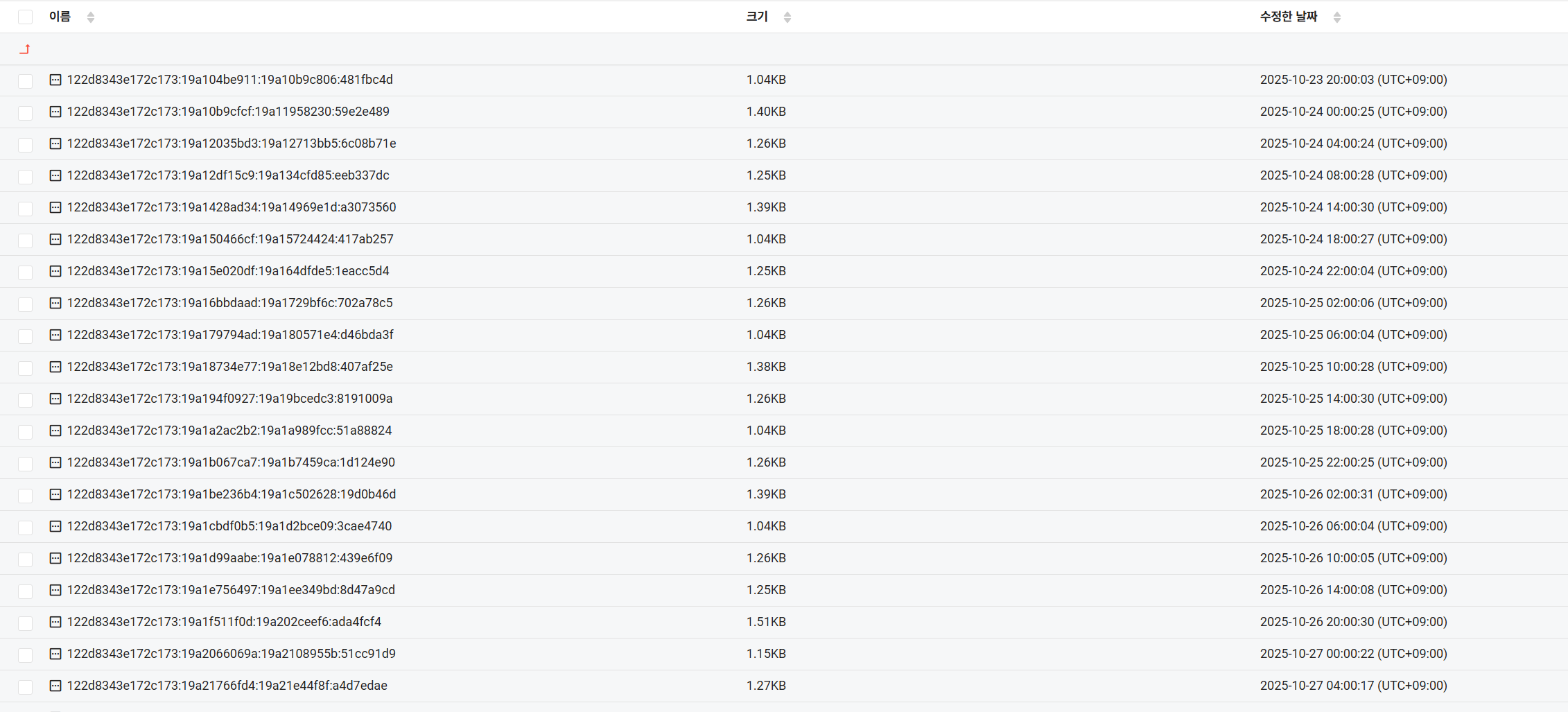
로그들이 쌓여있는 것을 확인할 수 있다!
참고할만한 블로그
https://sharing-for-us.tistory.com/21>
https://velog.io/@alli-eunbi/cgpfiy6q
https://nyyang.tistory.com/167
https://medium.com/@dudwls96/logging-grafana-loki-아키텍처-구성-6c1f0d83a5f3
https://nyyang.tistory.com/167
https://medium.com/@aditya.hilman_10961/enabling-log-retention-in-loki-with-compactor-fe3de2002b47
'K8S & Docker' 카테고리의 다른 글
| [NKS] NKS NAS 볼륨 CSI를 사용해 두개 이상의 pod끼리 파일 공유하기 (1) | 2025.10.27 |
|---|---|
| [NKS] K8S + uvicorn 에서 표준출력을 활용해 custom log를 남겨보기 (1) | 2025.10.27 |
| [NKS] K8S Cron Job으로 PVC 청소하기 🫧🧽 (0) | 2025.10.17 |